
How To Read A Non-Braille Book
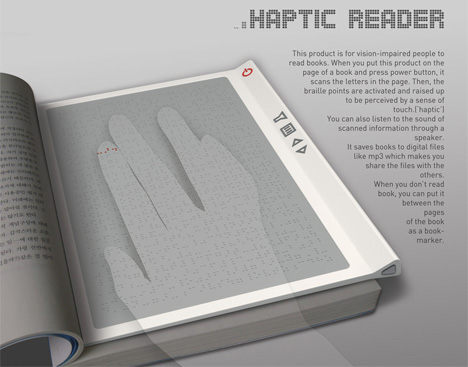
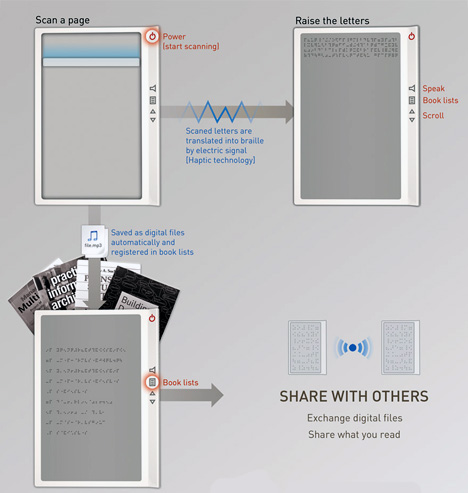
You’re blind, I mean sight impaired and the situation is that you wanna read Harry Potter but the Braille version is not available. So you pop out the “Haptic Reader”, place it on the front page, and allow it to scan the contents. Almost magically all the letters get converted to Braille, which dot the surface of the reader. Want more magic? Turn on the voice system, to hear the story instead.
Designers: David Lee, Yuna Kim & Hansub Lee







10 Comments »
Gavalari says
well, a page in braille alphabet might need much more space than its regular version but I’m not sure, can anyone enlighten me?
btw, why not integrate a memory card and make it an e-book reader? it can convert the letters of pdf or txt file into braille?
Gavalari says
oh sorry. it already has a memory card.
fredone says
yes it’s taking more space, but they placed scroll button to resolve this probleme.
but there is an other problem, that a braille surface doesn’t exist !
Muwasalat.com says
Great effort.
Charles Velardo says
I am interested in the Haptic reader and the Braille Interpreter. Are they for sale? Where? Cost?
Trackbacks