Lights, Camera, Glass…Action!
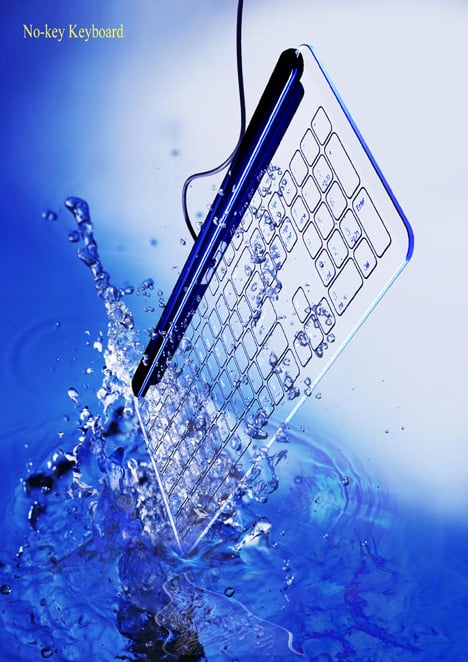
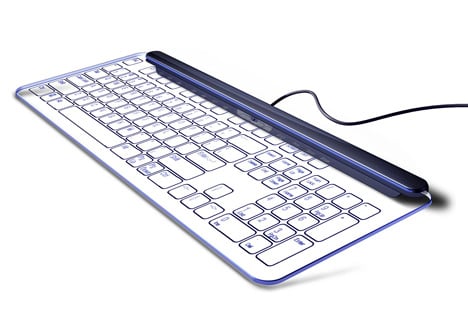
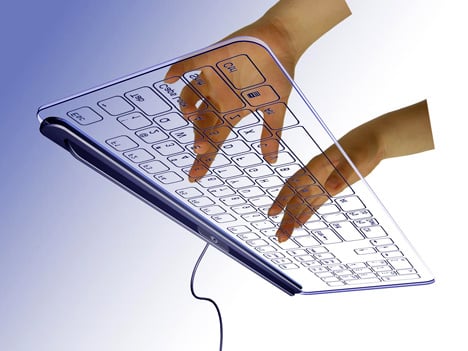
Glass surface inputting is the new hotness for almost every gadget maker today. From from the iPhone to Microsoft’s Surface technology, flat is where it’s at. Introducing the flattest full size QWERTY keyboard to date, “No-key Keyboard” by Kong Fanwen. Consisting of just a glass surface, camera and lighting, this alternative keyboard concept will use the latest motion capture technology to watch your fingers nervously select just the perfect smiley for your online bantering.
Designer: Kong Fanwen
If you liked this design, you would also be interested in:
- Lights…Action Camera
- Low Cost Disposable Video Camera by Jennifer Murphy
- Multipling Lights
- Best of June 2008
- Blooming Lights
Keep up with the latest designs by subscribing to our RSS or Newsletter.


139 Comments »
enoo says
Looks cute, for sure. But unusable.
Flat surface = no touch feedback = almost impossible to type without looking at your fingers = a PITA :/
And as most people, my fingers tend to brush the keys when I type. So, with this kind of keyboard, what will this slight brushing do? Will the camera be able to make a difference between that and a real “key stroke”? Will it write “zhjkerlblgopfd” when I just wanted to type “hello” ?
hugerobots says
I disagree. My fingers have been typing for most of my life and rarely do they ever miss a key. Hovering over the keyboard hasn’t ever been an issue for most people I know and if people do this, maybe they’ll be more sure about what they’ll be typing in the future.
Seeing as how this is a stylish move away from utility, it looks fantastic and would most likely work just as nicely.
enoo says
“I disagree. My fingers have been typing for most of my life and rarely do they ever miss a key.”
You mean you’ve been typing for years on a keyless keyboard? …
You know, I rarely miss a key on a normal keyboard too. Because of the feedback it gives. Typing on the equivalent of just a piece of glass would certainly be different.
And I’m sorry but I really don’t understand you when you said “maybe they’ll be more sure about what they’ll be typing in the future”. Why? Because they would have to look at where they type? Because they should make sure that their fingers are at least an inch away from the keyboard or the keyboard would think they just typed something? Sound more like a problem to me
Laurynn says
I think it would be cool to give it a go. Because when I first learned to type… as everyone else did too probably… we had to sit there and look where to place our fingers and we still used our index fingers to type! and now, we are full-fledged typists who are masters at it! I say give it a chance… yes, we will be there typing only with our index finger for a while, but give it a chance just like you did when you were little learning how to type. Hey, someday we will all be great at it! That is …if you want to learn.
Ignorance is Ignorance, not bliss says
people are whining about the seamless surface but most laptop keyboards are practically flat. With this keyboard they are just moving one more step to flat. Also everybody doesn’t use the same keyboard. Just because it won’t work for doesn’t mean it won’t work for everybody. when commenting think about the big picture.
Roderick says
Where can i buy one of these keyboards?
Chri says
Did you ever find out where to get one?
Roderick says
Never have been able to find one! I really want one of these, is like the future in front of me see it.
Austin_Buddha says
The reason this keyboard won’t work is that most touch typists rest their fingers on the keys whenever they pause. On a normal keyboard, you can touch any key without typing anything. On this keyboard, a light touch would produce an unwanted kaystroke. Maybe the hunt and peck crowd could use this keyboard since they only use two fingers and look at the keyboard. No touch typist could use this because there is no way to orient yourself to the home keys without looking. Ever notice that “J” and “F” have a little bump? That’s so you know your fingers are on the right keys when you start typing. Every touch typist uses the tactile feedback of the home keys to orient themselves whether they know it or not.
zippyflounder says
i have to agree, with out tactile feedback touch typing will not work for me i realy need to feel where the keys are.
james says
the feel of touching is easily to be solved when the keyboard is realized.
George says
Agreed. Traditional keyboard with keyswitch is still my preference.
james says
the principle of inputting:
When you click a key, there is a flat area between your finger and the object’s surface. The larger the area is the harder you click on the surface. So that the computer can judges whether you click or not depending on the size of the area that captured by the camera below. The flat area is small enough if you don’t really want to click or there is even not that kind of area if your fingers don’t touch the object. Computer can also judge which key you want to click depending on the location of the flat area.
julio says
maybe is time for you to elevate your skills, maintenance on that should be costless
Thomas Prikowitsch [bitspirits.com] says
i am currently building exactly that thing with the twist, that the surface will act as an multitouch-interface as well. i only have to put the camera way below the surface to get reasonable position-information.
the problem is the flat angle of the camera, that will make it hard do make out a distinct point of contact.
touch-feedback is possible by either making the surface vibrate, when you hit a distict key, or by embedding keys in a layer of soft transparent silicon, which would help with the blob-detection too.
if you - me too - tend to brush over the keys, that is not a problem. the camera can clearly see a difference between touching and “hovering”. not so much the camera then the high-band-filter that in the end seperates touchpoints from background.
a much simpler technique would be to use a already available display-touch-sensor. those are transparent as well.
rosa aguilar-aguila says
excelente idea, la limpieza del teclado de cristal, no seria problema pues existen pelìculas protectoras que podrìan apicarse desde su fabricaciòn y su limpieza seria tal vez 1 vez por semana.
FELICIDADES Y QUE PRONTO SALGA AL MERCADO
Sergio says
I want it! I love it !
me encanta absolutamente!
está genial definitivamente si existiera lo comprara, me encanta la tecnología táctil.
de los diseños mas creativos, novedosos y futuristas que he visto. me fascinó.
jin_woo_han says
I hope it will be real~
accessko says
Great concept keyboard. I hope the camera is accurate enough to detect your fingers.
james says
Thanks for all comments. the principle of inputting:
When you click a key, there is a flat area between your finger and the object’s surface. The larger the area is the harder you click on the surface. So that the computer can judges whether you click or not depending on the size of the area . The flat area is small enough if you don’t really want to click or there is even not that kind of area if your fingers don’t touch the object. Computer can also judge which key you want to click depending on the location of the flat area.
mad duke says
All this talk… myself and 1,000s of others want one of these at any cost!!??
amazing design
Tomasz says
This is wonderfull keys http://klawiatura.wordpress.com/ in glass will be better
T Blick says
where can i buy this ? at how much is it gonna set me back ?? very interested : )
web design company says
No keys doesn’t feel right, this will fail like the laser keyboard did. Also what if I like to smash my keyboard when I’m angry? I don’t want a shard of glass in my hand.
George says
Totally agreed with you. No key, it just doesn’t feel right to hit the hard surface.
DSI has many mechanical switch keyboard that brings back the typing sensation.
Lim says
This is so….. Apple next keyboard look alike
CompMage says
You also need to consider, something like this keyboard is not going to be replacing everything. It’s going to be an “executive” item. Something reserved to look really nice and get used lightly.
George says
Personally I like the keys that can travel and not wanting to hit a hard surface. DSI has a great selection of mechanical switch keyboard and DSI has been producing mechanical switch keyboard since 1990.
http://www.notestation.com/mechswitch.htm
I like all mechanical keyboard because it gives me the positive tactile feedback like the traditional IBM keyboard in 80′.
Good job DSI
Elder says
Why not wirelessssss????????
kingfw says
according to the image ,it is not really using motion capture technology,but using image-analyzing technology. the principle of inputting: When you click a key, there is a flat area between your finger and the object’s surface. The larger the area is the harder you click on the surface. So that the computer can judges whether you click or not depending on the size of the area that captured by the camera below. The flat area is small enough if you don’t really want to click or there is even not that kind of area if your fingers don’t touch the object. Computer can also judge which key you want to click depending on the location of the flat area
Inciter says
I personally wouldnt like a hard surface keyboard.
Maybe you could cut a gap between the keys. This would help a bit for the “hovering people” to tell if they are about to hit a button or between 2-3 keys.
and of course a small piece of glass on the “F” and “J” to tell where the starting potition for the index fingers should be.
Another idea would be to place a small projector next to the camera which will project the keys (so 1 keyboard = many language)
john says
is perfect end bealtifullll….
I like…
john
algorithmancer says
Touch feedback could be replaced by a led or very low sound. Feedback can be in any senses, it doesn’t need to be in the touch sense.
Gadgets says
It would take awhile to get used to the tactile(less) feedback, but there are other keyboards out there (fabric, laser) that would be just as hard and people are using those.
jorgyvan says
Muito Louco!!!
Gostei!
alibaba says
great idea……perfect design!!!
HELLEN says
oh…so great idea!….looks like crystal!!!!
Thierry says
It realy looks nice, no doubt.
As you know, design is not merely a matter of look.
To a large exent it is a matter of behaviour. And global advantage.
Just adding an item to the long list of current fashionable gadgets is not worth the effort maybe. And might not be very promising a goal for some designer.
Anyway, whatever approach you take, you can’t escape puting things on a cost/benefits grid. A more complex, more expensive, less power efficient device is useless.
But might prove a good looking toy on a shelf. Sure.
- T -
frankley says
if you really carefully think about the design you will find its cost and benefits…it is sitll a concept ,how can you know its cost and benefits? sitll dont know how you can get the decission of “more complex,more expensive …….”????
jully says
How can you get the conclussion about more complex more expensive or something ?
jully says
there are not so many keys and need not take time to assemble when producing, it use less materials than traditional keyboard.so I think it is not expensive.if it is , that just means manufacture can earn much more money…..
Nancy says
I do agree with jully…someone seems comment indiscreetly. The concept does not need printed board and keys, so it is simple for its construction. If possible , I think the light can be deleted ,too. there seems not necessary of light.
Morris says
For sure it is a great idea…it is still too early to say it useless or not.It is useful if some people like it. And for sure, there is not a product that can satisfy everybody.
Roaring.flames says
the idea is really good and the whole matter on whether or not it is usable is arguable…
personally, i do think it is practical for many… i don’t know about the others, but i used to have a difficult time using the mousepad on a laptop, but got used to it after a while.. the same principle would be applied in this case…
Trackbacks